
Accurate time and attendance, captured your way.
Collect time however your people actually work: timesheet, mobile, digital or physical timeclock, even tachograph. Popay Time brings it into one validated record, and because that record shares the same schedule as leave and payroll, nothing gets reconciled twice.
Time tracking breaks in predictable ways
The mess isn't the clocking. It's what happens after, when hours have to line up with leave and pay.
Hours live in three systems and never quite agree.
Popay Time: One validated record: time, leave and payroll read the same schedule, so there’s nothing to reconcile.
Part-timers, shifts and variable patterns break the maths.
Popay Time: Every person has their own planned schedule; balances and pay measure against it, not a generic full-time week.
Payroll only finds the errors after the run.
Popay Time: The payroll administrator checks hours against pay elements before the run. Discrepancies caught at source.
Every team clocks time a different way.
Popay Time: Timesheet, mobile, timeclock or tachograph: mix them freely; it all lands in one place.
Managers check every line, every week.
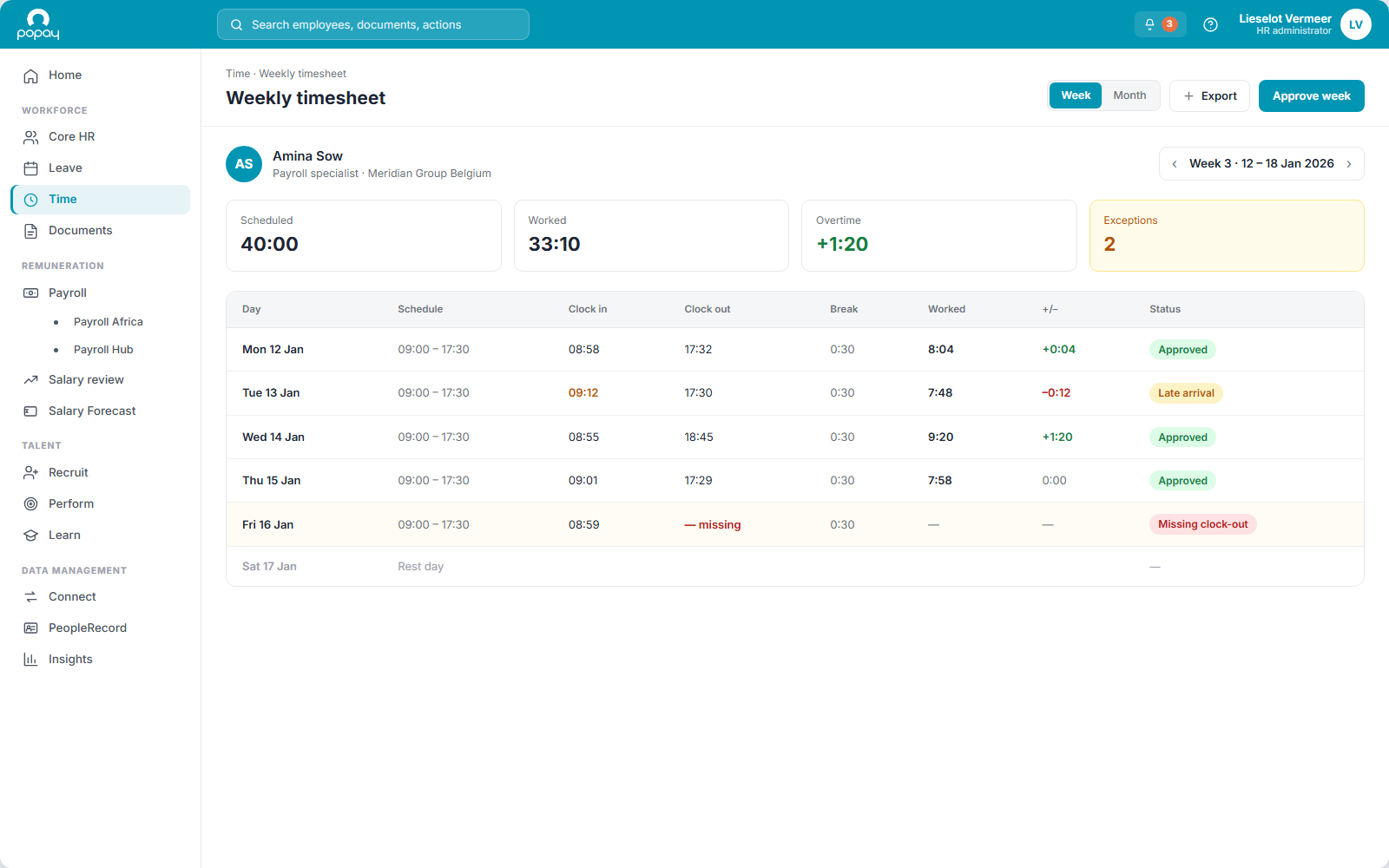
Popay Time: Actual time is compared to plan automatically; supervisors review only the exceptions.
You only trust the numbers after re-keying them by hand.
Popay Time: Validated time feeds payroll automatically. No manual matching across agreements, committees or providers.
Capture time any way you need
Different teams clock time differently. Popay Time is flexible on the how: use one method or mix them; everything lands in one validated record.
Online timesheet
Day, week or month, self-service.
Mobile device
Clock in from the field.
Digital timeclock
On-screen, on site.
Timeclock system
Physical badge / terminal.
Tachograph
Driving time for transport.
However it comes in → one validated record.
One schedule, three things depend on it
Define the planned schedule once (full-time, part-time, rotating shifts, variable patterns) and payroll, leave and attendance all read from the same source, instead of three systems you keep reconciling.
Planned schedule
The hours each person is supposed to work: the single definition the rest of the system reads.
Payroll
Knows the base hours to pay. Validated time converts to pay automatically.
Leave & holiday
A day off is measured against the plan, so balances stay correct even for part-time and variable schedules.
Attendance
Actual worked time is compared to plan; supervisors review only the exceptions.
Everything time and attendance needs
Recording, validation and control. Connected to leave and payroll from the start.
Work schedules & patterns
Define planned schedules per person (full-time, part-time, rotating shifts, variable patterns) as the basis for everything else.
Reconciliation
Actual time is matched against the planned schedule and leave records automatically. Planned vs actual, always current.
Reporting & alerts
Give managers the reporting and alerts they need to control time, overtime and cost.
Exceptions & validation
Supervisors review only what deviates from plan and validate entries, not every line, every week.
Compliance & policies
Enforce company policies on holidays, overtime and related expenses, consistently, across every location.
Payroll can check hours vs pay
Validated time flows to Popay Leave and Payroll, and the payroll administrator can check hours against the pay elements they produce before the run. Automation with a control point, not a black box.
What it looks like in each role
For employees
For managers
For HR
For the payroll administrator
Frequently asked questions
How does it handle part-time, variable and shift schedules?+
Each person’s planned schedule is defined individually: full-time, part-time, rotating shifts or variable patterns. Because pay, leave and attendance all measure against that plan, irregular schedules don’t break the maths the way they do when hours are just clocked in isolation.
How do time, leave and payroll connect?+
They share the planned schedule. Actual time reconciles against plan and leave; validated time feeds Popay Payroll automatically. One record per employee, no re-entry between systems.
Can the payroll administrator verify hours before a run?+
Yes. Before payroll is committed, the payroll administrator can check captured hours against the pay elements they map to (overtime, premiums, allowances) and catch discrepancies at source instead of unpicking them after the run. It replaces the manual reconciliation across multiple agreements, committees or providers.
Which time-capture methods do you support?+
Whichever fits your workforce: online timesheets, mobile, digital or physical timeclock systems, and tachograph for transport staff. However time is captured, it reconciles against the planned schedule and leave, and supervisors review only the exceptions.
How are overtime and policy compliance handled?+
Enforce company policies on holidays, overtime and related expenses, and give managers reporting and alerts to keep time and cost under control.
Which systems does it integrate with?+
Time is native to the Popay suite: Leave, Payroll and Core HR. For other systems it connects through the Popay integration layer.
How are security and privacy handled, including GDPR?+
Data is hosted in the EU on Oracle Cloud Infrastructure. Access is role-based and processing follows GDPR.
Time sits at the centre of the operational flow
Get time right at the source.
Set the schedule once and let payroll, leave and attendance run off it: accurate, compliant, and free of reconciliation.