
Every document, filed and audit-ready, on its own.
HR documents live in drives, inboxes and cabinets. Popay Docs is the HR document management software inside your HR system: one dossier per employee, files that chase what is missing, a record of who read what. Sensitive documents stay with the people you authorise.
Documents break down in predictable ways
The problem isn't the paperwork: it's the chasing, the filing by hand, and finding the gaps too late.
Employee files are scattered across drives, inboxes and cabinets.
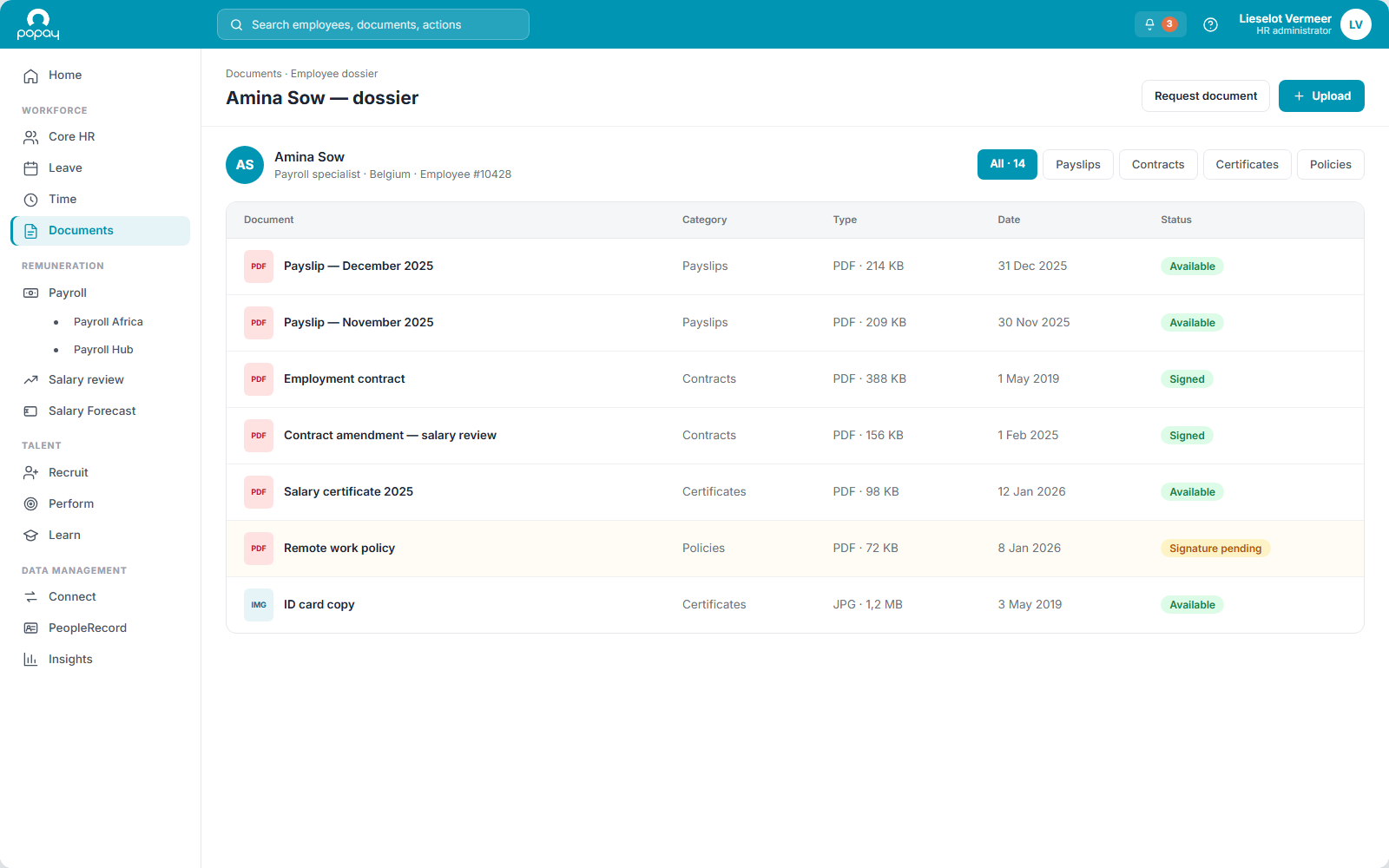
Popay Docs: One dossier per employee: every payslip, contract and certificate in one place, filed automatically as it arrives.
You find out a mandatory document is missing during an audit.
Popay Docs: Document Agents flag what's missing the moment it's needed and keep every file audit-ready.
You can't prove who actually read the new policy.
Popay Docs: Read & Sign records exactly who acknowledged each mandatory document, and when.
Sensitive files sit where the wrong people can open them.
Popay Docs: Dynamic role-based access keeps payroll, medical and vetting documents to the roles you authorise, and no one else.
Distributing payslips means filing thousands of files by hand.
Popay Docs: Payslips arrive by ZIP or FTP and publish to the right employee automatically, so nobody files anything.
An employee needs an attestation, so they mail HR and then wait.
Popay Docs: They request it themselves. Where the document type is generated automatically, the request and the delivery run without anyone touching them.
One dossier per employee, nothing scattered
Every payslip, contract, certificate and signed policy sits in one employee record, filed automatically as it arrives, not months later when someone gets round to it.
Documents arrive from everywhere. Payslips from payroll. Certificates from a completed course in Popay Learn. Receipts and hand-back proof from Popay Assets. Contracts, bank details and job data from Popay Core. Uploads from the employee. Popay Docs is where all of it lands in the same file, per person, with no predefined limit on the number of types or sources.
No shared drive, no inbox archaeology. HR, the manager and the employee each see exactly the documents they're allowed to, and nothing else.
What HR document management software has to do
One module covers the whole path: a file arrives, the right people see it, and the audit trail writes itself.
One dossier per employee
Every document tied to the right person and filed automatically: one place instead of drives, inboxes and cabinets.
Document Agents
Rules that flag missing files, chase the upload, request an acknowledgement and watch expiry dates, so nothing slips.
Read & Sign
A clear digital record of who acknowledged each mandatory policy, and when: the audit trail an inspector asks for.
Role-based access
Payroll, medical and vetting documents are visible only to the roles you authorise, set per document type, no IT ticket.
Bulk distribution
Payslips arrive by ZIP or FTP and map to the right employee. One upload sends a policy or announcement to an entire population.
Document request
An employee requests a document instead of mailing HR and waiting. Generated types deliver themselves; the rest pass an approval step you set per type.
Personal vault
A private space each employee keeps for their own notes, certificates and documents. Course material stays accessible long after the training itself has finished.
A document type, and the agent that brings it in
A Document Agent is the mechanism that decides how a document enters the platform. You define the document types your organisation works with, and link each one to one or more agents.
Generated automatically
A payslip from payroll, a certificate from a course completed in Popay Learn. It is created, filed and named without a person in the loop.
Uploaded by HR
For one employee, or for a whole population in a single move.
Registered by the employee
Self service, into their own dossier, with HR deciding what needs verification.
Required to upload
A mandatory gate at any point in the employment, not only at onboarding. The step does not complete until the document is uploaded and verified.
Delivered by an external system
Over FTP or SFTP, matched to the right employee automatically, duplicates avoided.
You find out you're covered before anyone asks
A lapsed certificate or an unsigned policy surfaces early, not in the audit, because the agent behind each document type watches it for you.
Privacy rules and labour obligations are handled by the same mechanics: role-based segregation, a Read & Sign trail, and post-departure access you set per document type.
Start with Popay Docs. Grow at your pace.
Run document management on its own, and connect the rest when you are ready. Integrated, but modular. Popay Docs is one module in the Popay software suite, sitting in Workforce administration next to Popay Core, Popay Leave and Popay Time.
Start
Run Popay Docs on its own: dossiers, bulk distribution and compliance agents working from day one.
Add
Bring in Popay Core, Popay Learn, Popay Assets or vetting checks when it suits, each a complete module in its own right.
Compound
Now it compounds: Popay Learn certificates auto-file, asset agreements trigger themselves, and vetting gates onboarding. One record, no re-keying.
What it looks like in each role
One dossier, three views. HR configures it, employees act on what is theirs, and managers see their team and nothing beyond it.
For HR
For employees
For managers
Connected across Popay, and to the systems around it
No middleware, no manual syncing. Documents share live data with the modules HR already uses, and arrive automatically from systems outside Popay over FTP, SFTP or ZIP.

Popay Core
Contracts and dossiers link to the employee record, so the document and the person stay one thing.

Popay Learn
Course completions auto-generate certificates and file them, with zero manual steps.
Popay Assets
Assigning an asset triggers a usage agreement, and the assignment is not authorised until it is signed.
Vetting checks
Required checks become mandatory gates: onboarding cannot complete until they are verified.
Joiner documents
A joiner starts with the right documents waiting in their vault, per population, from day one.
Requests and approvals
Document requests follow the same approval flows as every other request in the platform.

Popay Payroll
Payslip batches publish straight into the dossier, visible to the employee and authorised payroll admins.
External systems
FTP, SFTP and ZIP intake with automatic file matching. Files from outside Popay land in the right dossier.
Frequently asked questions
Is Popay Docs a separate product, or part of the platform?+
Either. Popay Docs runs on its own, as a document layer above the HR system you already have, or as part of the Popay HR platform. No separate installation and no IT project: HR configures the first document types and agents within a day, and legacy documents are ingested over SFTP and matched to the right dossiers automatically.
What is a Document Agent, exactly?+
It is the mechanism that decides how a document enters the platform. Every document type you define is linked to one or more agents: generated automatically, uploaded by HR, registered by the employee, required to upload as a gate on a step, or delivered by an external system over FTP. One type can combine several.
Can an employee request a document themselves?+
Yes. Instead of mailing HR and waiting, an employee requests the document from their own dashboard. Where the type is generated automatically, request and delivery run end to end with no intervention. Where a check is needed first, the request passes an approval step, and that flow is configurable per document type.
We use a different HR system. Can Popay Docs work alongside it?+
Yes. Popay Docs can ingest documents from external systems over automated FTP or SFTP, with file matching that puts every file on the right person and avoids duplicates. It runs as a central document layer above your existing systems, consolidating what is scattered without forcing a platform switch on day one.
How is it different from SharePoint or a shared drive?+
A shared drive stores files and waits. Popay Docs actively manages them: agents chase missing uploads, require acknowledgements, trigger workflows and watch expiry dates. That's the gap between storage and compliance.
Can we control who sees what, down to document level?+
Yes. Access is configured per document type using dynamic roles, not broad department permissions. Payroll Admins see payslips, Finance sees expenses, Security Officers see vetting documents, and medical records are isolated by default. The same document can be visible to different roles at different levels, all managed without IT.
How does it handle privacy and labour obligations?+
Access after departure is configured per document type, so a former employee keeps exactly the documents you decide, for the period you set. Role-based access keeps sensitive data segregated by default: medical, payroll and vetting documents are visible only to the roles you authorise.
Can it distribute payslips at scale?+
Yes. Payslips arrive via ZIP upload or automated FTP. The system matches each file to the correct employee, queues them for review, and publishes them at your chosen moment. Only the individual employee and authorised Payroll Admins can ever see them.
Do we need Popay Learn to use it?+
No. Popay Docs delivers full value on its own: payslip distribution, compliance workflows, bulk uploads, post-departure access and role-based security all work independently. The Popay Learn integration is a multiplier that removes training administration for organisations that use both, not a prerequisite.
Can external people, like auditors or candidates, get access?+
Yes, through scoped, time-limited access. An auditor, candidate or supplier can be given a restricted portal showing only the document categories they're authorised to review. Access expires automatically at the end of the defined period.
Make document chaos a thing of the past.
Take a no-commitment slot with one of our document specialists. We go through your document types, the agents that would bring each one in, and what the first dossier looks like on your own data. Nothing to prepare.