
Salary increases, run right: raises and bonuses within budget.
Increasing salaries and awarding bonuses at year-end is often a challenge to get done properly and easily. Give each department a share of the budget for a manager to distribute with a formula, or set it individually from evaluation scores. Either way, run the whole salary review cycle online, efficiently and seamlessly.
The annual review round is where things break
The intent is simple: reward people fairly, within budget. The mechanics (spreadsheets, emails, approvals, re-keying) are where it falls apart.
Nobody knows the total until the budget is already spent.
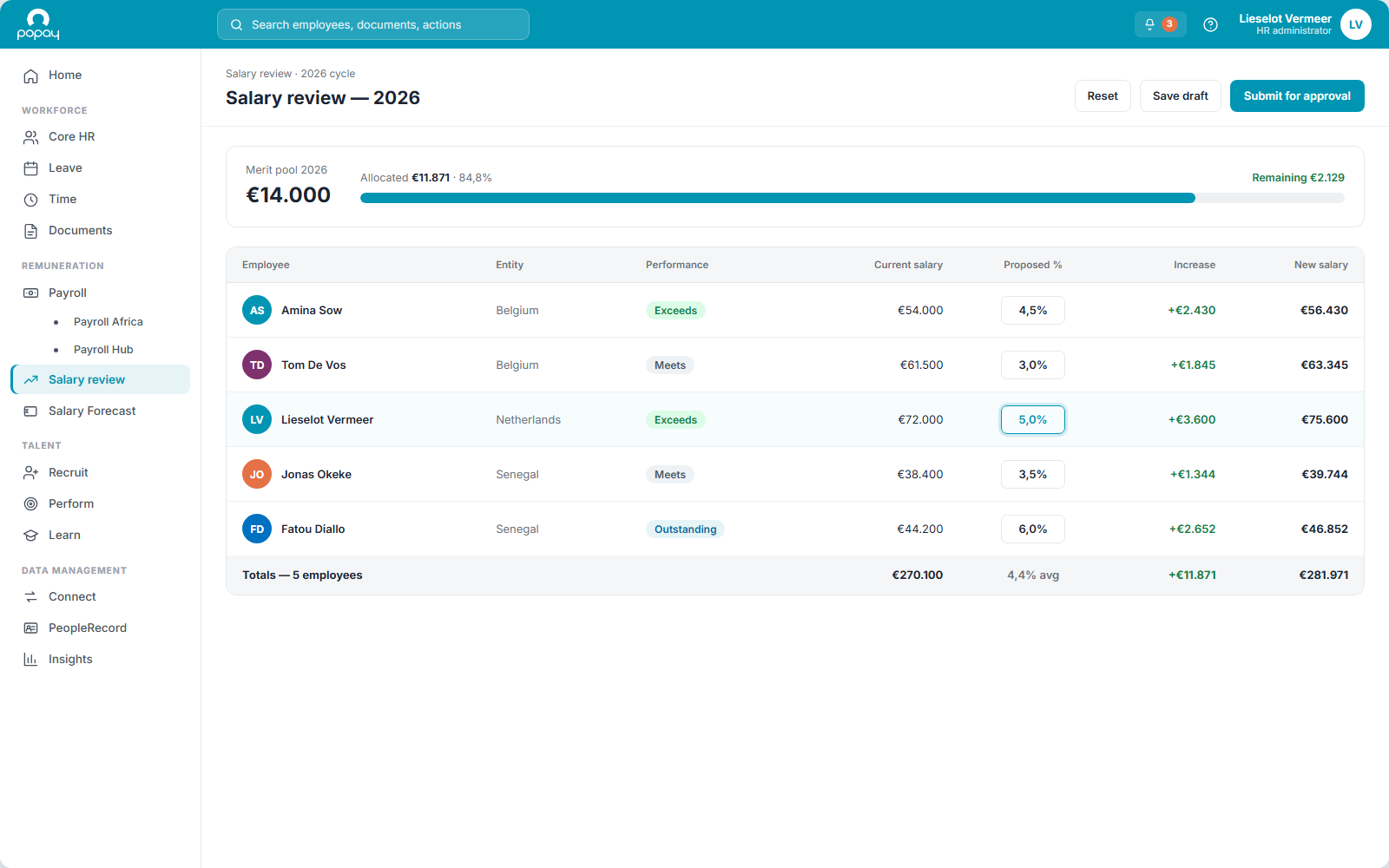
Popay Salary Review: The running total updates live as raises and bonuses are set, so no department overshoots the budget it was given.
Every department distributes its budget a different way.
Popay Salary Review: Give each one a percentage of the budget to allocate with a formula, or set amounts individually. Both, side by side.
Raises and bonuses feel ad-hoc and hard to defend.
Popay Salary Review: Tie increases to evaluation scores and clear rules, so every decision is consistent and explainable.
It all happens over email, spreadsheets and printouts.
Popay Salary Review: Run the whole cycle online: fewer errors, no privacy leaks, one place for the numbers.
Approvals get lost in inboxes.
Popay Salary Review: Approval procedures follow your org chart automatically. We set them up for you.
The result has to be re-keyed into payroll.
Popay Salary Review: Validated decisions update payroll on their own. No manual transfer, no re-typing.
Two ways to run a salary review
However you approach it, Popay supports it. Use one method or combine them across the organisation.
By department, with a formula
Give each department a percentage of the overall budget. The manager distributes it across the team using a formula: fast, fair, and always within budget.
Individually, from performance
Set raises and bonuses per person, linked to scores from the evaluation. Reward results directly, with a clear rationale behind every number.
Benefits
Let the system do the heavy lifting so your people can save their energy for the decisions that actually matter.
Save time
Work far more efficiently through automated procedures instead of spreadsheets and email threads.
Fewer errors and privacy issues
No more separate emails or printouts. Sensitive numbers stay inside one secure process.
A professional approach
Clear rules and evaluation-based decisions mean less discussion and negotiation with employees.
Less ad-hoc, more compliance
Let the system apply your policy consistently across every department and location.
Free your people up
Your team can save their energy for the matters that need judgement. Boost HR.
An automated process: input to output
Approval procedures are handled effortlessly. We set them up for you based on your organisational chart. The input comes in automatically from payroll and performance; after validation, the output updates payroll on its own.
Payroll & performance
Current salaries and evaluation scores come in automatically. No data gathering.
Approval workflow
Managers distribute and submit; approvals follow the org chart we set up for you.
Payroll updated
After validation, the approved raises and bonuses update payroll on their own.
Input from payroll & performance → validation → payroll updated. That saves a lot of time.
What it looks like in each role
For HR
For managers
For finance & control
For employees
Frequently asked questions
What is a salary review cycle in Popay?+
It's the round, usually annual, where you manage salary increases and bonuses within a set budget. You define the budget, choose how it's distributed (by department or individually from evaluation scores), collect approvals, and push the validated result to payroll, all in one online process.
How is this different from salary forecasting?+
Different jobs. A salary review manages increases and bonuses within a given budget for the current round. Salary forecasting projects your future salary mass from your known, committed and planned workforce plus assumptions. Popay covers both. This page is the review cycle; forecasting is a separate module.
How do the two distribution methods work?+
Either give each department a percentage of the overall budget for its manager to distribute with a formula, or set raises and bonuses individually from evaluation scores. You can combine them: one method for some teams, the other where it fits better.
Where does the input come from?+
Automatically from the payroll and performance modules: current salaries and evaluation scores. There's no separate data-gathering step, and no side spreadsheet to keep in sync.
How are approvals handled?+
Approval procedures are set up for you based on your organisational chart, so the right people validate at the right step. Managers distribute and submit online; nothing gets lost in an inbox.
What happens after everything is approved?+
The validated output updates payroll on its own. No manual transfer, no re-keying. That removes the error-prone hand-off at the end of the cycle.
How are security and privacy handled, including GDPR?+
Sensitive pay decisions stay inside one secure process instead of circulating over email or on printouts. Data is hosted in the EU, access is role-based, and processing follows GDPR.
Salary Review draws on the whole suite
Popay Compensation
The pay structures and bands the review measures raises and bonuses against.
Discover →Popay Perform
Evaluation scores feed the individual method. Reward links straight to results.
Discover →Payroll
Validated decisions flow to payroll automatically. The salary mass becomes real pay.
Discover →Reward people fairly, within budget.
Set the budget, distribute raises and bonuses fairly across the organisation, and let validated decisions flow straight to payroll.