
Leave your people can see, and request in seconds.
Ask most people how much leave they have left and they're not sure. Booking it means an email and a wait. Popay Leave gives everyone a clear view of their balance and one-tap requests, lifts leave admin off HR, and feeds payroll and time automatically.
Leave breaks down in predictable ways
The friction isn't the time off. It's the emailing, the guessing, and the tracking by hand that surrounds it.
People don't know how much leave they have left.
Popay Leave: Everyone sees their real balance at a glance, current to the day. No one has to ask HR.
Booking time off means an email and a wait.
Popay Leave: One-tap requests on any device, with the balance in view, and instant notice when it’s approved.
Balances are tracked by hand in a spreadsheet.
Popay Leave: Accruals and remaining days compute automatically from each work pattern. No manual tracking, no year-end reconciliation.
Approvals stall in someone's inbox.
Popay Leave: Requests route to the right approver through your org structure, with rules and limits applied. No bottleneck, no chase.
No one can see who’s off when.
Popay Leave: A team and organisation-wide calendar shows coverage up front, so it’s planned rather than discovered on the day.
Leave has to be re-keyed into payroll and time.
Popay Leave: Unpaid days and leave impact flow straight to payroll and time management, instantly, with nothing re-entered.
Everyone knows exactly where they stand
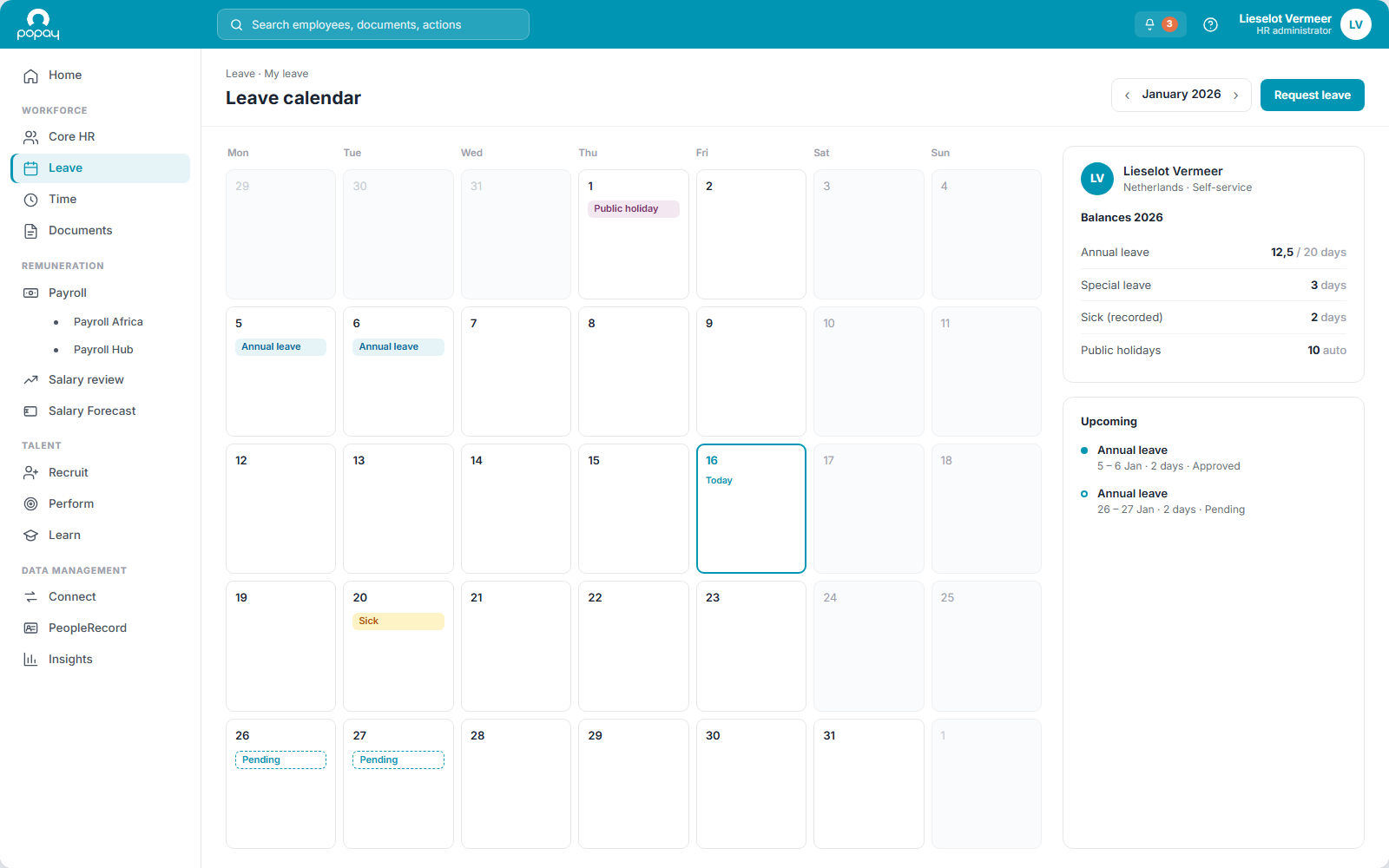
Every employee sees their balance and booked leave anytime. Computed automatically from their work pattern, so it's always right and never a spreadsheet.
No emailing HR to ask what’s left. No year-end reconciliation. Just a clear number, current to the day, on any device.
Everything leave management needs
From a request, to a right balance, to the impact on pay. Handled in one place.
Request in seconds
Employees book time off on any device in a couple of taps. No form, no email, no wondering if it landed.
A clear view of their leave
Everyone sees their balance and booked days at a glance. Always current, so no one has to ask HR where they stand.
Approvals without the chase
Requests route to the right approver through your org structure, with rules and limits applied. No bottleneck, no follow-up.
Balances that compute themselves
Accruals and remaining days calculate automatically from each work pattern, per leave type. No manual tracking, no reconciliation.
Team calendar
See who's off when, across a team or the whole organisation, so coverage is planned, not discovered.
Feeds payroll & time, instantly
Unpaid days and leave impact flow straight to payroll and time management, instantly, with nothing re-keyed.
Start with Leave. Grow at your pace.
Run leave on its own, and connect the rest when you're ready. Integrated, but modular.
Start
Run Leave on its own: self-service requests, approvals and accurate balances from day one.
Add
Bring in Core HR, Time or Payroll when it suits, each a complete module in its own right.
Compound
Now it compounds: balances compute from the schedule in Core HR, and leave impact flows straight to payroll and time. One record, no reconciliation.
What it looks like in each role
For employees
For managers
For HR
Frequently asked questions
How do employees see and request their leave?+
Every employee has a clear view of their balance and booked days, and requests time off in a couple of taps on any device, then sees the moment it’s approved. No emailing HR, no guessing what’s left.
How are balances calculated?+
Automatically, from each person’s work pattern and the rules for each leave type: accruals and remaining days update as leave is taken, so balances are always current without anyone tracking them by hand.
Which leave types does it handle?+
Holiday, sick, parental, special and statutory leave, each with the rules that apply in the relevant country.
How do approvals work?+
Requests route to the right approver through your org structure, with limits and rules applied automatically. Managers approve with the balance and the team calendar in view.
Can we see who’s off across the team?+
Yes. A team and organisation-wide calendar shows who’s away when, so coverage is planned rather than discovered on the day.
Does leave feed payroll and time?+
Yes. Unpaid days and leave impact flow to payroll, and time off updates time management, automatically. Pay and schedules stay right without re-entering anything.
Is Leave part of Time, or its own module?+
It’s its own module in the Workforce cluster. Run it on its own, or alongside Time and Core HR, which is where balances draw the work pattern from.
Part of the Workforce cluster
Make time off just work.
Requests and approvals in one place, balances that are always right, and a calendar everyone can see. Let's show you how.