
Excel is useful. But is it still fit for your HR management?
Excel remains a powerful tool for analysing, calculating and organising data. In a small organisation, a well-kept file can answer many needs. The problem appears when the spreadsheet becomes the main system for managing employees, absences, documents, job changes and reporting.
At that point, the question is no longer whether Excel is a good tool. It is whether a set of files can still guarantee the quality, confidentiality and availability of HR data as the organisation grows.
Why HR management in Excel reaches its limits
Competing versions appear
A file is emailed, copied into a folder or edited locally. Very quickly, several versions are in circulation. The team then spends time identifying the right source before it can even start its analysis.
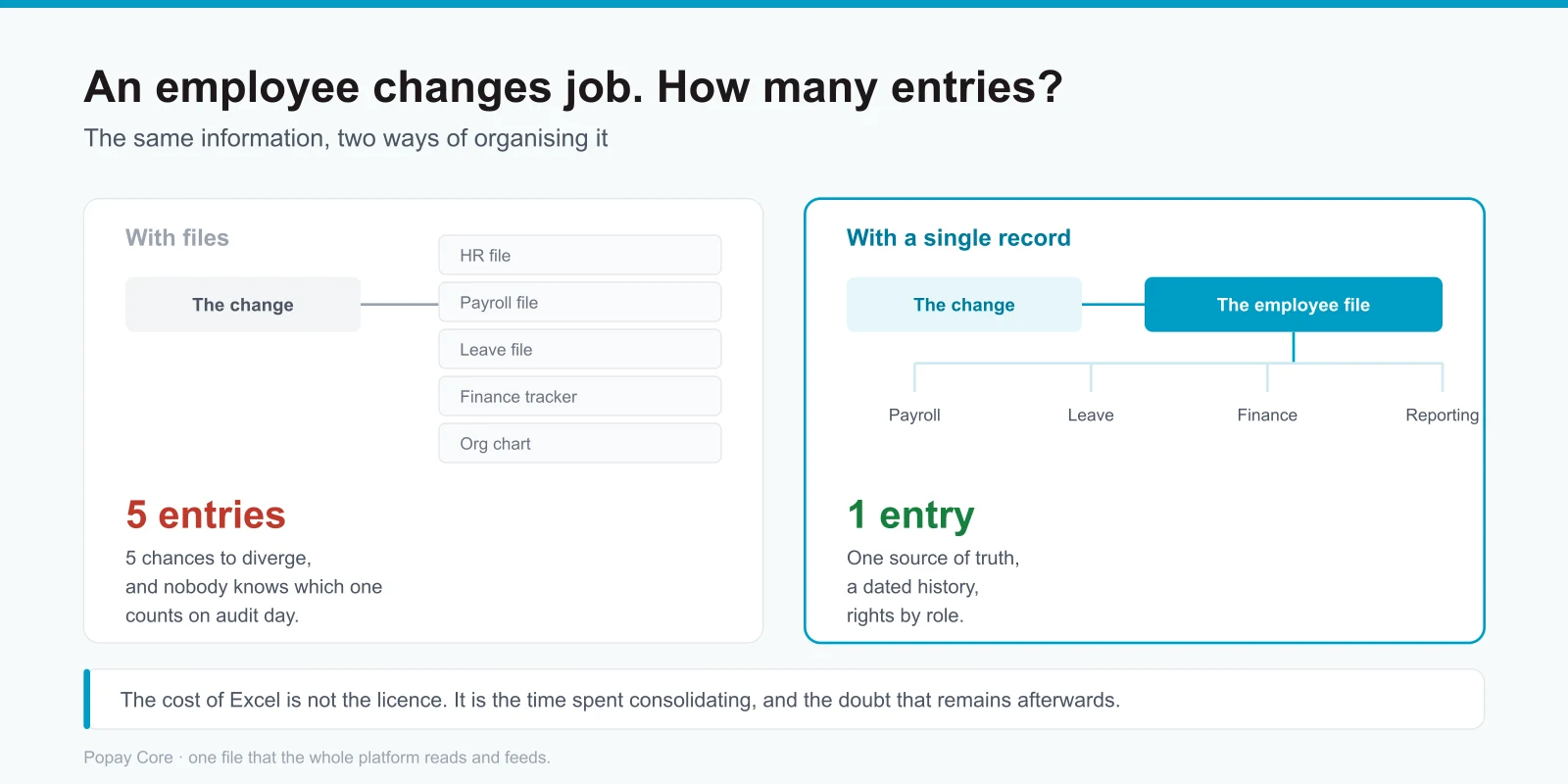
That is exactly what a single HR record makes disappear: one employee file that the whole platform reads and feeds. The question “which file is the right one?” simply stops being asked.
The same data is entered several times
A new hire, a pay rise or a change of assignment may have to be carried over into different files and systems. This duplication slows teams down and increases the risk of inconsistency between HR, payroll, finance and management.
Controls depend on people
The rules often live in formulas, naming conventions or one colleague’s memory. When that person is absent or leaves the company, the process becomes fragile.
A concrete example: the employee who comes back to the company. In a set of files, they are re-entered from scratch and their seniority is lost. In a record with a dated history, the file recognises them and their history stays intact.
Confidentiality is hard to control
HR data is sensitive. With shared files, it can be difficult to know who has viewed, edited or downloaded a piece of information, and whether access rights are still appropriate.
Reporting arrives after the decision
When data has to be cleaned and consolidated before every report, management receives a late snapshot. Teams explain the past instead of anticipating needs in headcount, skills or costs.
What an HRIS changes in practice
An HRIS centralises data and structures processes around one source of reference. It does not necessarily replace every existing tool. Its value comes above all from the consistency it brings to the employee lifecycle and from its ability to connect the people involved.
- One employee file, updated once
- Approval workflows for requests and changes
- Access rights matched to each user’s role
- A history of actions and changes
- Self-service for employees and managers
- HR indicators produced from one shared base
- Interfaces with payroll, time, finance or other applications
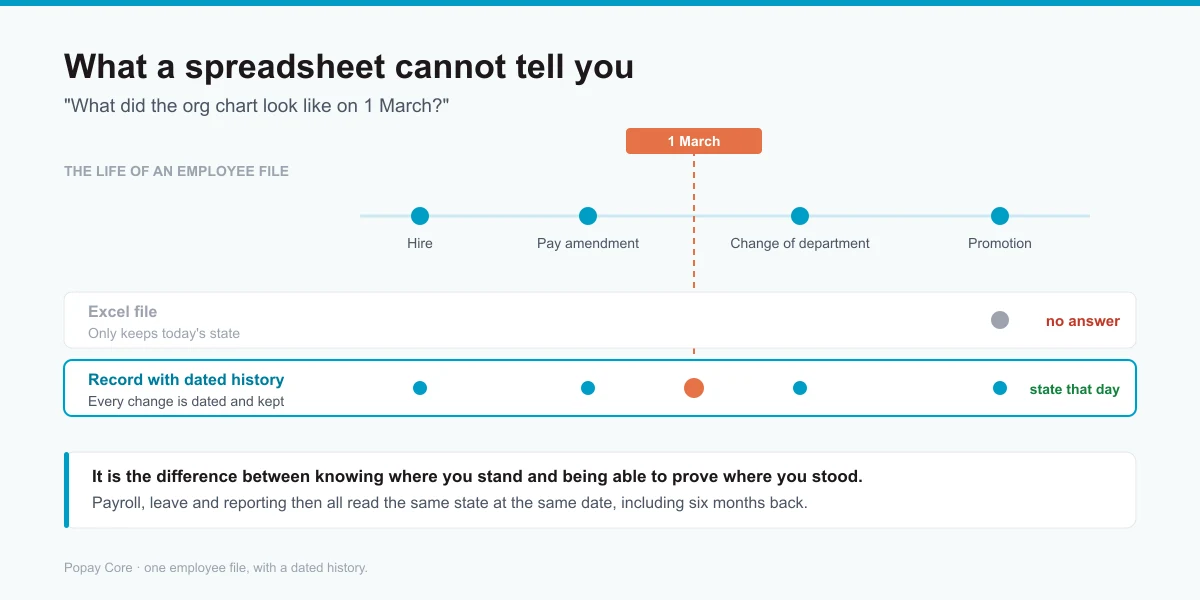
And above all, a dated history, the point most often underestimated. Contracts, amendments, suspensions and organisational moves are dated and kept. Payroll, leave and reporting therefore all read the same state at the same date. A spreadsheet cannot tell you what the organisation chart looked like on 1 March: it only knows its state today.
Excel or HRIS: six questions to decide
- How many files have to be updated when one piece of employee data changes?
- Can you quickly identify the reference version and the author of a change?
- How long does it take to produce a reliable indicator when management asks for one?
- Can employees and managers make their requests without manual back-and-forth?
- Does the process stay reliable when a key member of the team is absent?
- And the one that most often settles it: can you say what a person’s organisation chart, contract or salary was on a precise past date?
If several answers reveal a dependence on manual handling, the organisation has probably passed the stage where the spreadsheet can act as the main HR system.
This is not about getting rid of Excel
Excel keeps all its value for one-off analysis, modelling and certain controls. The change consists in no longer asking it to carry, on its own, operational management, access rights, workflows, history and the HR source of truth.
Popay Core helps organisations centralise employee data, structure HR processes and offer a simpler experience to employees and managers, while making connections with the existing ecosystem easier.
Client example: centralising CASSOA’s HR and contract data
CASSOA, the Civil Aviation Safety and Security Oversight Agency of the East African Community, serves the eight Partner States from its headquarters in Entebbe. The organisation wanted to better automate the tracking of contractual obligations and make employee and contract information easier to access. The CASSOA case shows the move from management based on several sources to HR information that is more structured and more easily accessible.
Frequently asked questions
From what size does an organisation need an HRIS?
There is no universal threshold. The right indicator is complexity: number of sites, volume of changes, approval levels, reporting requirements and data sensitivity.
Does an HRIS have to replace every HR tool?
No. A sound architecture can keep specialised applications and connect them to a central HR base.
How do you prepare the transition?
Start by mapping data, processes, owners, interfaces and pain points. Clean the data and define the governance rules before migrating.
Are your HR files multiplying and your teams spending too much time consolidating information? Request an HR maturity review with Popay. A working exchange, no commitment.
Read next: why global payroll across countries becomes a headache for group HR leaders, and the full set of Popay HR modules that the single record feeds.